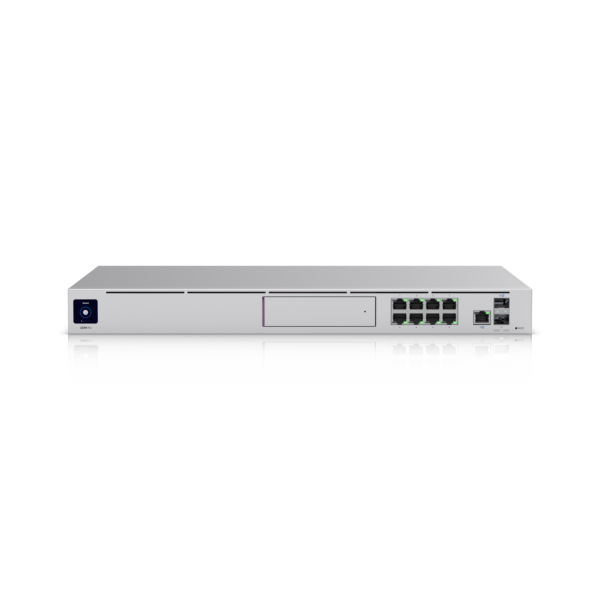
Ubiquiti · Model UDM-Pro
Rack-mount 10G cloud gateway with NVR bay for 100+ UniFi devices.
Overview
The UniFi Dream Machine Pro is a 1U rack-mount gateway that combines a firewall, a router, an 8-port switch and a UniFi console in one appliance. It runs the full UniFi application suite (Network, Protect, Access, Talk and Connect) and manages more than 100 UniFi devices and over 1,000 connected users.
With a 10G SFP+ WAN port, IDS/IPS routing up to 3.5 Gbps and a 3.5-inch drive bay for UniFi Protect video recording, it is a long-standing choice for offices, clinics and retail locations that want networking and video surveillance managed from the same interface.
Key specifications
| Form factor | Rack mount (1U) |
|---|---|
| Default WAN ports | 1 × 10G SFP+, 1 × GbE RJ45 |
| Other ports | 8 × GbE RJ45 LAN, 1 × 10G SFP+ LAN |
| IDS/IPS throughput | 3.5 Gbps |
| Managed UniFi devices / users | 100+ / 1,000+ |
| Cameras (UniFi Protect) | 24 HD, 14 2K or 8 4K |
| NVR storage | 1 × 3.5" drive bay |
| Processor / memory | Quad-core ARM Cortex-A57 1.7 GHz / 4 GB |
| Power | Internal 50 W PSU, USP-RPS DC backup input; 33 W max. |
| Operating temperature | -10 to 40 °C |
Figures from Ubiquiti’s published specifications. Specifications can change; ask us to confirm before you order.
Where it fits best
- Head office or branch gateway for 20 to 200 employees
- Network and video surveillance managed together
- Multi-site businesses linked with Site Magic SD-WAN
- Replacing a separate firewall, router and NVR
Industries it serves
Browse RUNDLJ equipment selected for these sectors:
Points to consider before buying
- Its LAN ports are 1 GbE; if you need 2.5 GbE on the gateway itself, look at the UDM-SE or the UDM-Pro-Max.
- The single drive bay is fine for a modest camera count; for redundant recording, the UDM-Pro-Max adds a second bay with RAID.
- IDS/IPS throughput (3.5 Gbps) comfortably covers most business internet links; above that, consider the UDM-Pro-Max (5 Gbps).
- Connect it to a UPS: Ubiquiti strongly recommends it to protect the device and its drive.
Frequently asked questions
Does the UDM-Pro need a license or a subscription?
No. Routing, firewall, VPN, SD-WAN (Site Magic) and the UniFi applications run without a license. Ubiquiti offers optional paid add-ons, such as CyberSecure threat-signature updates and extended hardware coverage, but the gateway works fully without them.
Can I manage the UDM-Pro remotely?
Yes. Once the gateway is linked to a UI account, it can be managed from a web browser or the UniFi mobile app, and several sites can be grouped in UniFi Site Manager.
Will it work with my existing internet modem?
In most cases, yes: connect the gateway’s WAN port to the modem or ONT provided by your internet provider. If that modem is also a router, ask your provider for bridge mode to avoid double NAT.
Does the UDM-Pro include a hard drive?
No. The 3.5-inch bay is empty; add a surveillance-rated hard drive if you plan to record video with UniFi Protect.
What is the difference between the UDM-Pro and the UDM-Pro-Max?
The Pro Max has a faster processor, twice the memory, 5 Gbps IDS/IPS instead of 3.5 Gbps, a 2.5 GbE WAN port, a built-in 128 GB SSD and two drive bays with RAID. It manages about twice as many devices and users.
Does RUNDLJ ship this product to Canada and the United States?
Yes. RUNDLJ supplies this product on order to businesses across Canada and the United States. Contact us for current pricing and lead times.
Videos
Official videos published by Ubiquiti.
How to Install: Ubiquiti UniFi UDM-Pro
Documentation
Need the official datasheet, the quick-start guide or the installation guide? Ask RUNDLJ and we will send you the manufacturer’s documents with your quote.
Related products in the wiki
Get pricing and availability
RUNDLJ supplies this product on order across Canada and the United States. Our bilingual team answers quickly.
Wiki page updated November 2026.