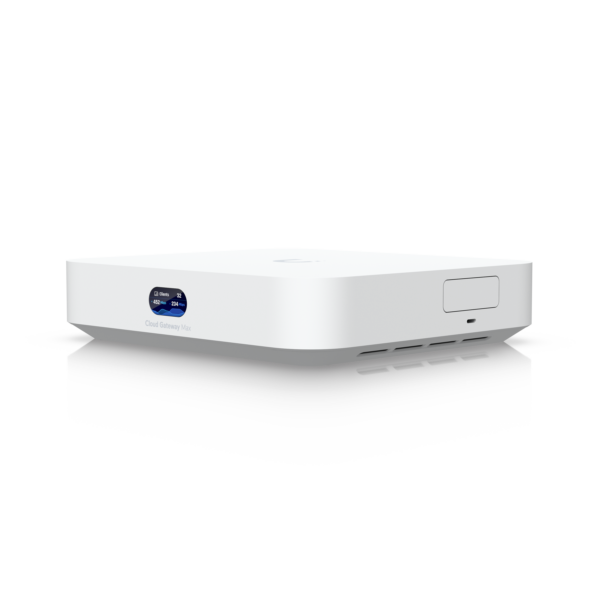
Ubiquiti · Model UCG-Max
Compact 2.5 GbE gateway with full UniFi apps and optional NVMe storage.
Overview
The UniFi Cloud Gateway Max puts a full UniFi console in a small desktop box. Its five 2.5 GbE ports, 2.3 Gbps IDS/IPS routing and support for every UniFi application make it a strong fit for small businesses with 30+ UniFi devices and up to about 300 users.
An NVMe slot accepts an optional SSD (up to 2 TB) so UniFi Protect can record cameras without a separate recorder. It is powered by USB-C with the included adapter.
Key specifications
| Form factor | Compact desktop |
|---|---|
| Ports | 5 × 2.5 GbE RJ45 (1 WAN by default, up to 4 WAN) |
| IDS/IPS throughput | 2.3 Gbps |
| Managed UniFi devices / users | 30+ / 300+ |
| Cameras (UniFi Protect) | 15 HD, 8 2K or 5 4K |
| Storage | Optional NVMe SSD up to 2 TB |
| Processor / memory | Quad-core ARM Cortex-A53 1.5 GHz / 3 GB |
| Power | USB-C (5 V, 5 A), adapter included; 16.1 W max. |
| Dimensions | 141.8 × 127.6 × 30 mm |
Figures from Ubiquiti’s published specifications. Specifications can change; ask us to confirm before you order.
Where it fits best
- Small offices, clinics and stores without a network rack
- Franchise locations that need the same setup at every site
- Internet services up to about 2 Gbps with threat protection
- A few cameras recorded on the gateway itself
Industries it serves
Browse RUNDLJ equipment selected for these sectors:
What technical reviews say
A summary, in our own words, of what independent reviewers and testers have reported about this product.
- Dong Knows Tech rated it 9/10 and called it one of the most impressive entry-level multi-gig routers, powerful enough for most small networks despite its size.
- Mighty Gadget described the version without storage as a capable, well-rounded device that offers excellent value for money.
- LazyAdmin highlighted the difference with the cheaper Cloud Gateway Ultra: 2.5 GbE ports and support for every UniFi application, including Protect, instead of 1 GbE and Network only. Some owners mention it runs warm, so give it some ventilation.
Frequently asked questions
Does the UCG-Max need a license or a subscription?
No. Routing, firewall, VPN, SD-WAN (Site Magic) and the UniFi applications run without a license. Ubiquiti offers optional paid add-ons, such as CyberSecure threat-signature updates and extended hardware coverage, but the gateway works fully without them.
Can I manage the UCG-Max remotely?
Yes. Once the gateway is linked to a UI account, it can be managed from a web browser or the UniFi mobile app, and several sites can be grouped in UniFi Site Manager.
Will it work with my existing internet modem?
In most cases, yes: connect the gateway’s WAN port to the modem or ONT provided by your internet provider. If that modem is also a router, ask your provider for bridge mode to avoid double NAT.
Is there a version with storage included?
Yes. Ubiquiti sells the UCG-Max with or without a preinstalled NVMe SSD (the version without storage is often labelled UCG-Max-NS). Tell us which one you need when you request a quote.
Does it have WiFi?
No. Add one or more UniFi access points, such as the U7 Lite or U7 Pro. If you want WiFi built into the gateway, look at the Dream Router 7 or the UniFi Express 7.
Does RUNDLJ ship this product to Canada and the United States?
Yes. RUNDLJ supplies this product on order to businesses across Canada and the United States. Contact us for current pricing and lead times.
Videos
Official videos published by Ubiquiti.
UniFi Networking Innovations: Site Manager, Network 8.3 and Cloud Gateway Max
Documentation
Need the official datasheet, the quick-start guide or the installation guide? Ask RUNDLJ and we will send you the manufacturer’s documents with your quote.
Related products in the wiki
Get pricing and availability
RUNDLJ supplies this product on order across Canada and the United States. Our bilingual team answers quickly.
Wiki page updated November 2026.