Chat with us, powered by LiveChat

✓ Shipping worldwide from warehouses in the U.S. and Canada

RUNDLJDATANETWORKSVOICEDATA · NETWORKS · VOICE

✓ Expédition partout dans le monde depuis nos entrepôts aux États-Unis et au Canada

RUNDLJDATANETWORKSVOICEDATA · NETWORKS · VOICE
,

Plantronics CS540 Spare Battery (86180-01)

Replacement Battery CS540 Wireless Headset

- +
SKU: 86180-01 Categories: , Tags: , ,

Plantronics Battery CS540 – 86180-01


Compatible with: CS540


TECH TIP: How to replace the CS540 battery
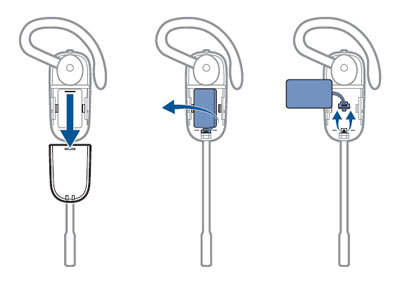
1) Slide the battery cover off and remove it from the headset
2) Pull the battery out of the attachment clip
3) Grasp the battery connector and disconnect from the headset (Avoid pulling by the wires)
4) Plug the new battery to the battery connector
5) Once connected, slide the battery into place
6) Slide the cover back on and push it into place
7) Place headset into base for charging

RUNDLJDATANETWORKSVOICEDATA · NETWORKS · VOICE

Before you go…

Get 10% off and free shipping on your first order when you join our VIP program.